Topic: blog posts

Leaf IT Drives £6,000 for Autism NI at Annual Royal Belfast Golf Day


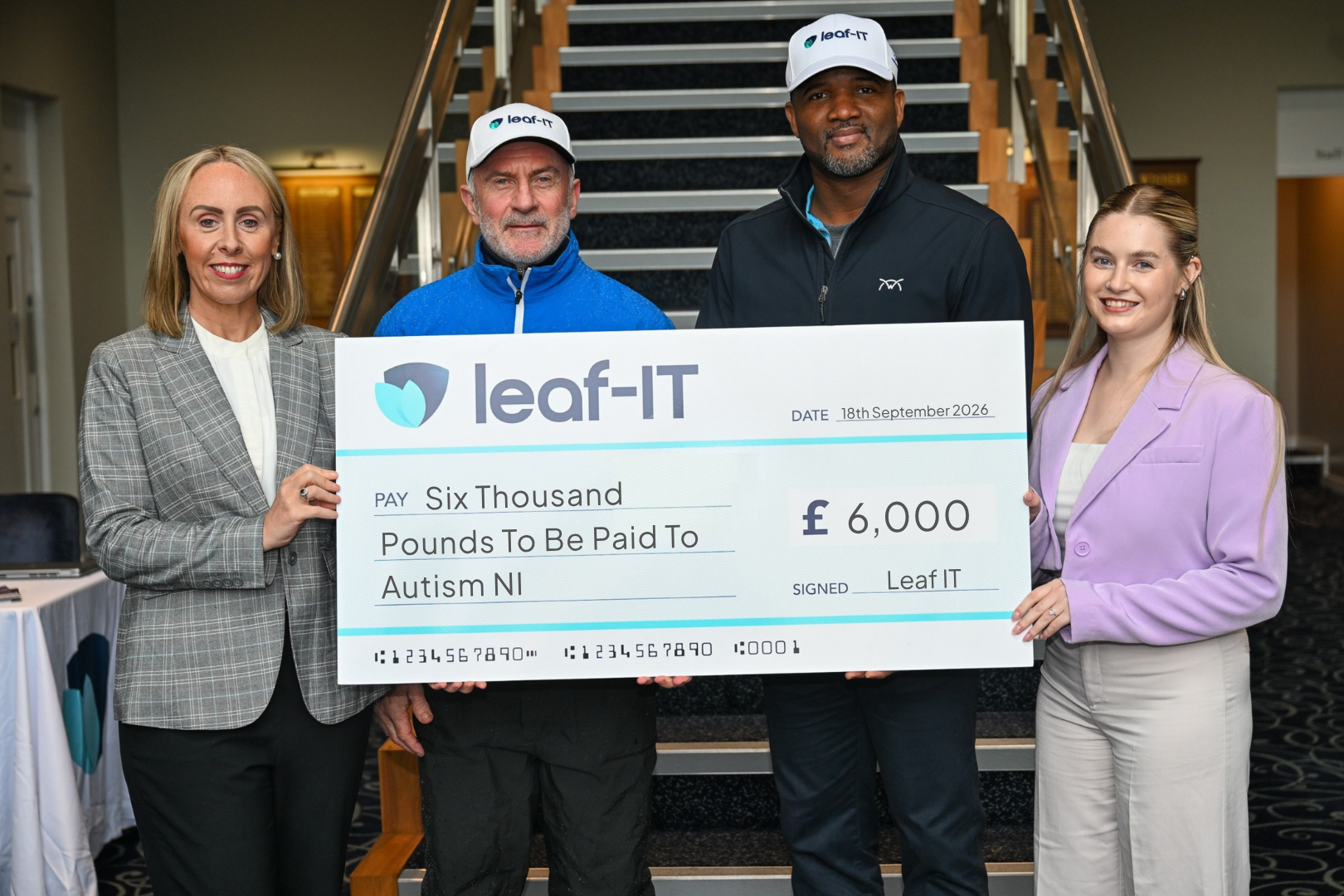
(Sorcha Matthews, Corporate Fundraising Manager at Autism NI, Steven Goldblatt, Executive Chairman at Leaf IT, Andre Lynch Senior Sales Engineer at ConnectWise, Hannah Beasant, Sales and Marketing Assistant at Leaf IT.)

Leaf IT, a leading technology partner and cyber security provider, has raised £6,000 for Autism NI through its 2026 Leaf IT Golf Day, sponsored by ConnectWise, a global leader in Cyber Security. Held on Friday 18th September at Royal Belfast Golf Club, one of Ireland’s most prestigious courses, the event welcomed 48 golfers from across Leaf IT’s community of clients, partners and friends in support of Northern Ireland’s autism charity.

Officially opened by Leaf IT Executive Chairman, Steven Goldblatt, the day combined golf, learning and networking, featuring:

  • An Autism Awareness Session delivered by Autism NI, offering valuable insight into the importance of understanding neurodiversity.
  • A ConnectWise Cyber Session, with experts from Leaf IT and ConnectWise sharing insights on the evolving cybersecurity threat landscape.
  • 18 holes of golf alongside a putting competition at one of Ireland’s oldest and most prestigious golf clubs.

Every pound raised will go directly to Autism NI, supporting their helpline, the first point of contact for many autistic people, parents, carers, families, and professionals, to get individualised autism support and the right information for them.

“We’re incredibly grateful to everyone who joined us at Royal Belfast and dug deep for such an important cause,” said Steven Goldblatt, Chairman at Leaf IT. “Raising £6,000 for Autism NI is a fantastic result, and it reflects the generosity and community spirit of our clients, partners and team. Thank you to ConnectWise for their continued support, to Autism NI for a genuinely eye-opening awareness session, and to everyone who helped make the day such a success.”

The Golf Day builds on Leaf IT’s long-standing partnership with ConnectWise, which named Leaf IT a Pinnacle Partner in 2025 – one of only two in Ireland – following its recognition as ConnectWise Global Cybersecurity Partner of the Year in 2023.

“ConnectWise is proud to sponsor the Leaf IT Golf Day and to support the incredible work Autism NI does,” said Mike Hague, Senior Regional Sales Manager at ConnectWise. “Leaf IT consistently shows that great partners deliver value well beyond technology, and this event is a brilliant example of that. Congratulations to everyone involved on such an impressive total.”

“We’re hugely grateful to Leaf IT, ConnectWise and all 48 golfers for raising £6,000 for Autism NI,” said Sorcha Mathews, Corporate Fundraising Manager at Autism NI. “This will go directly to our helpline, making sure autistic people, parents and carers across Northern Ireland always have someone to turn to when they need advice and support.”

About Leaf IT
Leaf IT is an award-winning technology provider with over 24 years of experience delivering proactive IT support, advanced cybersecurity, and cloud solutions to organisations across the UK and Ireland. Trusted by clients in sectors including professional services, manufacturing, healthcare, education, and the not-for-profit space, Leaf IT combines deep technical expertise with outstanding customer service.

Visit Leaf-IT.com

About Autism NI
Autism NI is Northern Ireland’s longest serving autism charity and training provider. They work to provide life changing services for over 35,000 autistic people and their families throughout Northern Ireland.
Their Autism Helpline is the first point of contact for many autistic people, parents, carers, families, and professionals, to get individualised autism support and the right information for them.
Autism NI’s Helpline Service operates from Monday to Friday 9am – 5pm.
028 9040 1729

Visit AutismNI.org

Celebrating Chloe’s Placement Year at Leaf IT

A year can make a big difference. As Chloe wraps up her placement with Leaf IT, she reflects on the projects, experiences, and lessons that will help determine the next stage of her career.

Over the past year, Chloe has worked across both our Modern Work and Service Desk teams, gaining hands-on experience of the IT industry and life within a Managed Service Provider. From supporting customers and developing PowerShell scripts to contributing to internal Power BI projects, she has embraced every opportunity to learn and take on more responsibility.

Before she heads back to university, we asked Chloe to reflect on her placement experience, the skills she has developed and what comes next.

Looking back on your placement year at Leaf IT, how would you describe your experience, and what surprised you most about working across both the Modern Work and Service Desk teams?

This past year has been an exciting change of pace from university, and I’m grateful to come away with fond memories and a greater understanding of the IT industry. I would describe the experience as valuable, varied and a bit of a rollercoaster at times. It offered me exposure to the inner workings of a technology partner, especially having worked across both the Modern Work and Service Desk teams.

The team made me feel welcome from the get-go and were very supportive when I ran into problems beyond my depth of knowledge. Jumping between the two teams, I was surprised by how the different areas of service worked together, and it allowed me to develop a much broader technical skill set.

What’s been your biggest achievement and key learning, and what skills will you take forward into your final year?

One of the most interesting things I got to work on during my placement was Leaf-IT’s internal Power BI custom connector. I was able to apply my prior knowledge of databases to understand the data being pulled from our PSA software and manipulate it using Power Query M. This was a big achievement for me as I had never worked with the language before and, once rolled out, the connector made a significant difference in speeding up report refreshes and reducing the load on Power Query.

Every day was a learning day, but the most critical skill I’ll take forward is problem-solving. Regularly resolving IT support requests strengthened my analytical thinking and taught me to approach problems methodically while considering the wider impact of any changes made.

How has the placement helped you develop both personally and professionally, and what’s next for you as you return to university?

“Throughout the placement year, I progressed from learning fundamental Microsoft skills to independently delivering client solutions, developing PowerShell scripts and configuring Microsoft environments.

I took on more responsibility as I went and developed strong self-management skills. Working with clients and in teams has taught me to adapt how I communicate and recognise when to seek guidance.

I’m now returning to Queen’s for my final year with a clearer idea of the direction I want to take my career. I will continue to invest in my own development, taking opportunities to expand my technical knowledge and build my professional network.

The experience has provided a solid foundation for my future career and given me a greater appreciation for the importance of continuous learning, adaptability, and collaboration in the ever-evolving technology sector.”

Thank You, Chloe!

Chloe has become a valued member of Leaf IT over the past year, and her enthusiasm, dedication and willingness to get involved have made a real impact across the business.

We would like to thank Chloe for all her hard work and support throughout her placement. We wish her every success as she returns to university for her final year and takes the next steps in her career.

Good luck, Chloe! 👋

Why 95% of Cyber Incidents Start with Human Behaviour, not Technology Failures

When businesses think about cybersecurity, the focus is often on technology. Firewalls, endpoint protection, network monitoring and threat detection tools are all designed to prevent systems from failing and keep attackers out. While those controls are essential, they only address part of the challenge.

In reality, technology is rarely the weakest link. More often, security incidents happen because of the way people interact with technology during the course of their day-to-day work.

The Number Worth Paying Attention To

According to Mimecast’s State of Human Risk 2025, 95% of cybersecurity issues can be traced back to human error rather than a technical failure (Mimecast, State of Human Risk 2025). In most cases, the root cause isn’t an unpatched server or a failed security product. It’s a person making a decision that seemed reasonable in the moment, whether that’s clicking a link, approving a request, sharing information or misconfiguring a setting.

This finding is reinforced by Verizon’s 2024 Data Breach Investigations Report, which found that 68% of breaches involve a human element (Verizon, 2024 Data Breach Investigations Report). While the methodologies differ, both studies point to the same conclusion: for most organisations, cyber risk is no longer centred solely on infrastructure. It’s tied directly to human behaviour across email, collaboration tools, cloud platforms and business applications.

Human Error Doesn’t Mean Carelessness

It’s tempting to look at these statistics and conclude that employees simply need more training. However, the data suggests the issue is more nuanced than that.

Mimecast’s platform data shows that just 3% of users are responsible for 92% of malware incidents (Mimecast Engage product documentation). Rather than indicating widespread risky behaviour across an organisation, this suggests that risk is often concentrated among a relatively small group of individuals, while the majority of employees consistently follow security guidance.

Research from Gartner provides further context. According to its Top Eight Cybersecurity Predictions for 2023–2024, more than 90% of employees who carried out an insecure action were aware that their behaviour introduced additional risk (Gartner, Top Eight Cybersecurity Predictions for 2023–2024, March 2023). In other words, the issue frequently isn’t a lack of awareness. Employees are often navigating competing priorities, tight deadlines and operational pressures, and security can lose out to convenience when people are trying to complete tasks quickly.

Understanding this distinction is important because it shifts the conversation away from blame and towards designing security processes that work within the realities of modern working environments.

The Perimeter Has Changed

The traditional model of cybersecurity was built around protecting a defined network perimeter. A decade ago, the majority of employees worked from a fixed location, on company-managed devices, behind a corporate firewall. Today, work happens everywhere.

Employees access business systems from home, customer sites, shared workspaces and mobile devices. As a result, the edge of the organisation, often referred to as the attack surface, is no longer a physical location. It extends to every user, device and login connected to company data.

Mimecast’s State of Human Risk 2025 highlights the significance of this shift, reporting that approximately 8% of employees account for around 80% of an organisation’s risk exposure (Mimecast, State of Human Risk 2025). This isn’t a reason to distrust employees; rather, it demonstrates the value of understanding where risk is concentrated and applying security controls accordingly, rather than assuming every user presents the same level of exposure.

What This Means in Practice

For business leaders and IT teams, there are several important lessons to take away.

Awareness training remains valuable, but training alone is unlikely to eliminate human risk. Most employees already understand basic security principles, so the challenge lies in maintaining secure behaviours when people are busy, distracted or under pressure.

Organisations also benefit from identifying where risk is concentrated instead of applying the same controls indiscriminately across the workforce. If a relatively small percentage of users account for the majority of risky behaviour, targeted support, monitoring and guidance will often have a greater impact than broader policy changes.

Perhaps most importantly, security strategies need to align with how people actually work. Policies that rely on perfect decision-making in every situation are unlikely to succeed. Effective cybersecurity programmes recognise that mistakes happen and build safeguards that help reduce the likelihood and impact of those mistakes.

Across Northern Ireland, we regularly see organisations with robust technical security controls and committed employees, yet gaps still emerge because security processes haven’t evolved alongside modern working practices. Addressing human risk isn’t about tightening restrictions, it’s about creating an environment where secure decisions are easier to make.

The Threat Landscape Is Evolving

The challenge for organisations today is that human risk is no longer operating in the same threat environment as it was a few years ago.

While human behaviour remains one of the most common entry points for cyber incidents, artificial intelligence is changing the speed and scale at which attackers can exploit mistakes. Threat actors are increasingly using AI to accelerate tasks such as reconnaissance, phishing, credential theft and attack execution, enabling them to operate more efficiently and at a greater scale than ever before.

CrowdStrike reported in their latest findings (2026 Global Threat Report) that attacks by AI-enabled adversaries increased by 89% year-on-year, demonstrating how rapidly attackers are adopting and weaponising AI technologies. At the same time, the average time taken for cybercriminals to move through a compromised environment fell to just 29 minutes, significantly reducing the window organisations have to detect and contain threats.

This means that what may once have been a relatively minor security lapse can now have far greater consequences. A compromised credential, a rushed decision or a successful phishing attempt can provide attackers with the opportunity to move quickly through systems before security teams have time to respond.

As cyber threats continue to evolve, organisations must ensure their cybersecurity strategies evolve alongside them. Technology remains a critical line of defence, but it must be supported by effective security processes, user awareness and a proactive approach to identifying and reducing human risk.

In an environment where attackers are becoming faster, more automated and more sophisticated, building cyber resilience is no longer just about preventing attacks. It’s about ensuring your organisation can detect, respond to and contain them when they occur.

Get In Touch

The first step in improving cybersecurity is understanding where the real risks lie, and we recognise that there’s no one-size-fits-all approach. Whether you’re reviewing existing security measures or planning for the future, our team is always available to discuss how we can support your organisation in navigating an increasingly complex security landscape.

Tell us about your cybersecurity challenges, training requirements, or any questions you have about reducing human risk within your organisation.

Leaf IT briefing reveals critical cyber resilience gap facing Irish businesses

(Left to right: Andrew Johnston, Managing Director at Leaf IT, Steven Wood, Director, Sales Engineering at OpenText, Manny Leon, Senior Territory Manager at eSentire, Hannah Beasant, Sales and Marketing at Leaf IT, Rachel Morrow Senior Sales and Marketing at Leaf IT, Darryl Heanen, Technical Director at Leaf IT, David Tweedale, Head of MSP Channel, UK & Ireland at Mimecast and Stephen Browne, Head of Public Affairs at Dublin Chamber.)

Business leaders from across Ireland gathered in Dublin this week to discuss one of the most pressing risks facing organisations today; cyber resilience.

At an executive briefing hosted by Leaf IT in partnership with Dublin Chamber, over 50 senior executives, IT leaders and risk professionals came together to discuss the cyber threat landscape facing organisations

The event, From Threat to Action: Cyber Resilience for Irish Businesses, focused on the practical steps organisations can take to strengthen resilience in an increasingly complex landscape.

Held at Dublin Chamber on Wednesday 10th June, the breakfast briefing featured insights from leading cyber security specialists at eSentire, Mimecast, OpenText and Leaf IT.

A consistent message throughout the event was that cyber security is no longer solely an IT issue but a business risk that requires board-level accountability.

Delegates heard that just 8% of employees generate 80% of an organisation’s cyber risk, reinforcing the importance of security awareness, identity protection and human risk management in the age of AI.

eSentire’s latest threat intelligence further highlighted the urgency, revealing a 389% year-on-year increase in credential access and account compromise incidents. The implication is clear cyber criminals are increasingly targeting user identities as a route into organisations.

Recovery readiness is often overlooked, research presented by OpenText found that fewer than 50% of organisations would be able to restore basic business operations within 48 hours following a cyber incident, reinforcing the need for robust backup, disaster recovery and incident response strategies.

Andrew Johnston, Managing Director of Leaf IT, said the event demonstrated the urgent need for organisations to move beyond awareness and take practical action.

“The threat landscape continues to evolve at an unprecedented pace, and what was clear from today’s discussions is that many organisations remain exposed in practice – particularly around identity security, user behaviour and recovery readiness.

For many businesses, the starting point is not more tools, but better visibility, understanding critical business processes, specific cyber risks and the recovery capabilities”.

The event forms part of Leaf IT’s ongoing commitment to helping organisations across Ireland strengthen their cyber resilience. Leaf IT’s expert team help organisations understand their risk exposure and prioritise the controls and processes that matter most.

A Practical Guide to Detecting and Responding to Identity Threats

Cyber security has evolved, but many businesses have not yet adapted their defences to match. Identity Threat Detection and Response (ITDR) is now critical, as traditional tools such as firewalls, antivirus, and endpoint protection are no longer the primary line of defence.

Attackers are increasingly using stolen credentials, phishing, MFA fatigue and session hijacking to gain access. In many cases, there is no obvious “break-in.” Access is achieved through legitimate authentication, making malicious activity appear normal at first glance. 

This shift is why identity has become the new security perimeter and why businesses must focus on detecting and responding to identity-based threats in real time. 

However, many IT teams still lack visibility across identity activity in cloud and SaaS environments, making it difficult to identify compromised accounts quickly or respond effectively once suspicious behaviour begins. 

This guide outlines the key warning signs of identity risk and breaks down the core principles of Identity Threat Detection and Response (ITDR), focusing on how to strengthen visibility, detection, and response across your identity framework. 


The Three Warning Signs 

Identity-based attacks are rarely obvious at first, but there are clear indicators that your business may be exposed: 

  1. Unusual or risky sign-in activity goes unchallenged
    Logins from unfamiliar locations, devices, or times are not consistently investigated or correlated with expected user behaviour.
  2. MFA is enabled but still being exploited
    Attackers are increasingly using MFA fatigue, token theft, and social engineering to bypass authentication controls.
  3. Suspicious activity is detected too late
    By the time alerts are reviewed, attackers may have alreadyincreased access levels, spread across systems, or accessed sensitive data. 

If these patterns sound familiar, the issue is often not a lack of tools, but a lack of identity-focused detection and response capability. 


Why does effective identity security start with visibility? 

Modern digital ecosystems span cloud platforms, SaaS applications, remote devices and hybrid infrastructure. Identity signals are often fragmented, making it difficult to build a complete picture of user behaviour. 

At a high level, identity visibility means understanding: 

  • Who has access 
  • What they are accessing  
  • From where and on what device  
  • Whether that activity is expected for that user  
Common visibility gaps 

Limited behavioural context
A login event alone is not enough. Without established patterns of normal user activity, it is difficult to determine what “normal” looks like. 

Fragmented identity data
Identity signals often sit across multiple systems, making correlation and investigation challenging. 

Alert fatigue
Security teams are overwhelmed with alerts that lack context or prioritisation. 

Without strong visibility, malicious activity can appear indistinguishable from legitimate user behaviour, particularly in cloud-first environments. 


What does effective identity-based threat detection involve? 

Modern attackers operate within trusted identity flows using valid credentials, making their activity harder to detect with conventional approaches. 

Effective identity detection focuses on: 

Behavioural anomaly detection
Identifying deviations from normal user behaviour, such as distant travel, unusual resource access, or atypical login patterns. 

Real-time monitoring and alerting
Detecting suspicious activity as it occurs, rather than after the fact. 

Context-driven alerts
Providing meaningful insight into why an event is suspicious, not just that it occurred. 

Common limitations in traditional approaches 

Over-reliance on baseline security tools
Native identity platforms provide signals but often lack deeper correlation and prioritisation. 

Lack of identity-specific focus
Many solutions are designed around endpoints or networks rather than identity behaviour. 

Delayed investigation workflows
Even when alerts are triggered, teams often lack a clear path to validate and respond quickly. 

This is where ITDR becomes critical, delivering detection capabilities purpose-built for identity threats. 


Why is response critical in identity security? 

Identity-based attacks move quickly, often using legitimate access, which makes rapid response essential. 

A strong identity response capability includes: 

Rapid containment
Disabling compromised accounts, revoking sessions, and enforcing credential resets. 

Clear investigation context
Understanding what was accessed, changed, or potentially exfiltrated. 

Streamlined or automated remediation
Reducing reliance on manual intervention during active incidents. 

Common response challenges 

Unclear ownership
Responsibility for identity incidents is often split between IT and security teams. 

Manual processes
Slow response increases attacker dwell time and potential impact. 

Uncertainty around alerts
Teams hesitate to act without confidence in the notification. 

The result is delayed containment and increased risk. 


The ITDR Approach 

Identity Threat Detection and Response (ITDR) brings visibility, detection, and response together into a unified, identity-focused capability. 

Leaf IT works with solutions such as Huntress ITDR which is designed to shut down identity attacks by continuously monitoring identity activity, identifying anomalous behaviour, and enabling a fast and confident response. 

In practice, ITDR helps businesses: 

  • Gain clear visibility across identity systems and infrastructure  
  • Detect suspicious behaviour in real time  
  • Respond quickly to reduce the impact of compromised accounts  

As identity becomes the primary attack surface, this approach is no longer optional, it is essential. 

The AI Readiness Factor 

As businesses adopt AI-powered tools, identity security becomes even more critical. 

AI systems rely on identity and access controls to determine what data users can retrieve. If those controls are weak or poorly monitored, the risk of unintended data exposure increases significantly. 

Without strong identity governance: 

  • Sensitive data may be exposed to unauthorised users  
  • Suspicious activity may go undetected for longer  
  • Attackers can exploit legitimate access pathways more easily  

ITDR strengthens the foundation required for secure AI adoption by improving visibility and control over identity-based access. 


Where to Start 

Improving identity security does not require replacing existing systems, but it does require understanding where the gaps are. 

A practical first step is an Identity Cyber Security Assessment. 

In a short review session, you can: 

  • Analyse your current identity environment  
  • Identify gaps across visibility, detection, and response  
  • Highlight key risks and prioritised improvements  


Claim your Complimentary Identity Cyber Security Assessment today and strengthen your business’s first line of defence.

Is Your SharePoint Actually Working? A Practical Guide to Permissions, Structure and Usability

Most organisations have SharePoint. Far fewer have a SharePoint that actually works. 

The files are there, the sites are there, access has been granted but watch how people actually behave day-to-day and a different picture emerges. Documents get emailed instead of shared, copies pile up on desktops “just in case”, and IT fields a steady stream of access requests, clean-up jobs, and complaints about things being impossible to find. 

In almost every case, SharePoint isn’t the problem. Governance is, or rather, the absence of it. 

These environments tend to grow quickly and quietly: a site spun up for a project here, access granted to unblock someone there, libraries accumulating, ownership drifting. Before long the system is technically functional and practically painful. 

This guide is a practical self-assessment covering the three areas that cause the most trouble when left unchecked: permissions, structure, and usability. If the scenarios below feel familiar, your SharePoint probably needs attention.  

Three Warning Signs Your SharePoint Needs Attention

You don’t need a full audit to know when something is wrong. The same three signals appear again and again, and in our experience, most organisations are dealing with at least one of them. 

  1. People email files instead of sharing links

When users doubt that a colleague will be able to access a shared document, they attach the file instead. It feels quicker and safer in the moment, but it’s usually a sign that confidence in the permission model has broken down. People are unsure who can see what, whether links will work, or whether sending one will generate a support ticket. 

Once email attachments become the default, version control disappears and duplication spreads. SharePoint is no longer the single source of truth; it’s just another place files might live, alongside inboxes, desktop folders, and shared drives. 

  1. IT is constantly firefighting

When permission rules are unclear or inconsistently applied, users start working around them. They grant access themselves, move folders, or create new sites because it seemed easier at the time. None of this is malicious; it’s a predictable response to friction. 

The problem is that every workaround adds complexity. IT then gets pulled in to resolve issues they didn’t create:  

  • missing files 
  • unexpected access 
  • broken structures 

Time that should go towards improvement gets spent on investigation and repair. These are symptoms of governance gaps, not technical failures. 

  1. Who has access to what  

This is the most common issue we encounter. Users can’t find files, or they can see something but can’t access it, or they’re reluctant to delete anything just in case. Over time, SharePoint fills with outdated content, abandoned sites, and unclear ownership. Things that should take seconds start taking days. 

Without ownership there’s no accountability, and without accountability nothing ever gets fixed.  

Permissions – The Foundation Everything Else Depends On 

Permissions in SharePoint can be confusing. They control who can see, edit, share, and manage content, and they underpin everything else in the system. When permissions are well designed, SharePoint feels predictable and safe. When they are not, trust erodes quickly, both for users and for anything built on top of the environment. 

What Permissions Actually Do 

At a high level, permissions determine who can access a site or library, what level of control they have (view, edit, or full control), and whether content can be shared further. Problems rarely stem from permissions existing; they arise from how and where those permissions are applied over time, often in small, well-intentioned decisions that are never revisited. 

The Three Permission Mistakes We See Most Often 

Broken inheritance 

SharePoint is designed to inherit permissions cleanly from site to library to folder, which helps keep access clear and auditable. The trouble starts when one-off access is granted at file or folder level. Over time, these exceptions quietly pile up. 

It becomes increasingly difficult to see at a glance who has access to what. People can retain access they no longer need or were never meant to have in the first place. As visibility drops, confidence drops too, and permission changes begin to feel risky rather than routine. 

At this point, even experienced administrators struggle to answer basic access questions with certainty. When the underlying access model is unclear, that uncertainty is felt across the environment, including in search results and in answers surfaced by tools that draw on SharePoint content. 

Over‑permissioning 

When too many people have edit or full control access, sites become unstable. Structures change unexpectedly, content is deleted or moved, and sensitive information becomes visible to the wrong audience. While it can feel easier in the moment, broad access trades short‑term convenience for long‑term fragility. 

Over‑permissioning does not just increase security risk; it also blurs authority. When many users can change or restructure content, it becomes harder for anyone, human or automated, to distinguish which information is current, approved, or reliable. 

No regular review 

People change roles, projects end, and contractors leave, but permissions rarely keep up. Even a well‑designed SharePoint will degrade over time without regular reviews and clear site ownership. Many of the issues we see could have been avoided with simple, scheduled checks. 

As access drifts, the gap between who should have access and who does have access widens. That drift does not correct itself. Instead, it becomes normalised until the environment no longer reflects how the organisation actually works. When organisations then look to tools like Microsoft 365 Copilot to help surface information, those tools rely entirely on this existing access model. They do not fix permission issues; they reflect the reality of them. 

Clean, predictable permissions are what allow SharePoint to behave consistently. They support everyday collaboration, reduce risk, and ensure that any assistance layered on top of the environment produces results people can trust.  

How Structure Affects Findability and Control 

Structure in SharePoint is not simply about putting files somewhere. It is about making information findable, understandable, and predictable, so people know where to work without having to stop and think. When structure is done well, users trust the system. When it is not, they work around it, and that uncertainty carries through everything that relies on the environment. 

What Do We Mean by Structure? 

At a high level, structure covers four things: 

  • How many sites you have 
  • What each site is actually for 
  • How document libraries are organised 
  • How deep folders go within those libraries 

In SharePoint, sites should represent clear areas of work, such as departments, teams, or projects. Libraries then act as the primary way of grouping documents within those sites. Folders still have a place, but only when used sparingly. 

When sites, libraries, and folders are used interchangeably, context is lost. Users are left guessing where work should live, and tools that depend on that structure, whether search or Microsoft 365 Copilot, have very little signal to work with beyond file names and storage paths. 

How Site Sprawl Happens 

The most visible structural issue we see is site sprawl, where dozens of sites exist with unclear, overlapping, or forgotten purposes. 

It usually starts with good intentions. A new project needs its own space. A department wants autonomy. Microsoft Teams automatically creates a SharePoint site in the background. Nobody wants to block productivity, so everything gets approved. 

Over time, these sites turn into dumping grounds. Libraries called “General” or “Misc”. Folders buried six levels deep. Files saved wherever there happened to be room. Instead of guiding behaviour, SharePoint becomes something people have to navigate carefully rather than confidently. 

In environments like this, even when information exists, it is difficult to surface reliably. Search results become noisy, and when users turn to assistance tools for help, the responses are shaped by the same cluttered structure underneath. 

The Impact of Poor Structure 

For users, poor structure leads to three common problems: 

  • Time wasted searching or browsing 
  • Uncertainty about where documents belong 
  • Reluctance to delete or clean up content 

When people are unsure whether they are in the right place, they hedge their bets. Documents get duplicated, outdated versions linger, and nothing ever quite feels safe to remove. Over time, the volume of content grows, but clarity diminishes. 

For IT teams, the impact is just as clear: 

  • Increased access and “missing file” tickets 
  • Unnecessary storage growth 
  • Higher security and compliance risk 

As content spreads across overlapping sites and loosely defined libraries, it becomes harder to establish authority. Multiple versions of similar documents coexist, and there is no clear signal about which one reflects the current state of the business. In these conditions, answers returned by tools like Microsoft 365 Copilot may be technically correct, but difficult for users to trust or validate. 

A well‑structured SharePoint mirrors how the business actually works. When sites, libraries, and folders each have a clear purpose, information carries stronger signals. Content is easier to find, easier to interpret, and easier to rely on, whether users are navigating the environment themselves or asking questions of it. 

Usability and Adoption 

You can have clean permissions and a logical structure in place and still struggle with SharePoint adoption. Usability is what determines whether people actually choose to work in SharePoint day to day, or quietly revert to desktops, shared drives, and email attachments. 

Usability is not about making SharePoint look impressive. It is about making it feel clear and predictable for everyday users, so they know where they are, what they are looking at, and what to do next. That sense of clarity underpins user confidence and shapes how much people trust the system as a whole. 

Common Usability Issues 

Poor navigation is one of the biggest barriers to adoption. When users cannot easily tell where they are, how they got there, or where to go next, confidence drops quickly. This is often made worse when content is spread across one large catch‑all site or multiple overlapping folders, leaving people unsure which location they should actually be working from. 

Using clearly defined sites per department or team helps set context, reduces duplication, and makes navigation more intuitive. Navigation should guide users to the most relevant sites, libraries, and pages without forcing them to search or guess. When people lack that context, even correctly surfaced content can feel difficult to interpret or act upon. 

Another common problem is pages that act as document dumping grounds. Pages filled with long lists of links provide very little context. Users are left asking which document is current, which resource applies to them, and where to start. This issue is amplified when similar documents exist across different folders or sites. 

In these situations, assistance tools may be able to surface documents quickly, but users may still struggle to judge whether what they are seeing is the right content or simply one of many similar versions. Well‑designed pages use short explanations, clear headings, and purposeful links to guide behaviour rather than overwhelm it. 

A lack of visual hierarchy also causes issues. When everything on a page looks the same, nothing stands out. Important resources get buried, and users miss key information simply because it is not clearly signposted. Without visual cues to indicate importance or relevance, people must rely on trial and error rather than confidence. 

The Training Gap 

SharePoint is not overly complex, but it is not intuitive by default. Many organisations assume people will simply figure it out. 

Light, practical onboarding makes a measurable difference. When users understand why sites are structured a certain way, how to navigate confidently, and how to work with libraries and views, they stop working around SharePoint and start trusting it. That trust becomes increasingly important when organisations introduce tools such as Microsoft 365 Copilot, where users need to understand and validate the information being surfaced rather than question it. 

Adoption improves not because of new features, but because the system finally makes sense to the people using it. When SharePoint feels usable, predictable, and easy to navigate, users are far more likely to engage with it directly and to rely on any assistance layered on top of it. 

When permissions are clean, structure reflects how the business actually works, and SharePoint is easy to navigate day to day, Microsoft 365 Copilot becomes far more useful and predictable. Readiness comes down to the basics being in place, so Microsoft 365 Copilot has something reliable to work with, rather than highlighting gaps that already exist. 

Book a Free SharePoint Optimisation Report 

If any of this sounds familiar, our free SharePoint Optimisation Report is designed to give you a clear and realistic starting point. 

We review three key areas of your SharePoint environment: 

  • Permissions 
  • Structure 
  • Design and usability 

The aim is to highlight what is working well, where friction is being introduced, and what is quietly creating risk or inefficiency. The outcome is practical and prioritised, not a technical deep dive. 

What we need from you 

  • Read only access to your SharePoint environment 
  • An admin account to access your SharePoint settings 

What you receive 

  • A concise written report 
  • Outline of key factors identified and why they matter 
  • Practical guidance on which areas to prioritise 

Whether your next step is improving day to day usage, improving collaboration, or preparing your environment for Copilot in the future, this review gives you clarity without obligation. 

Simply fill in the form to book your Complimentary SharePoint Optimisation Report:

NI Business Leaders Urged To Take Greater Responsibility For Cyber Security

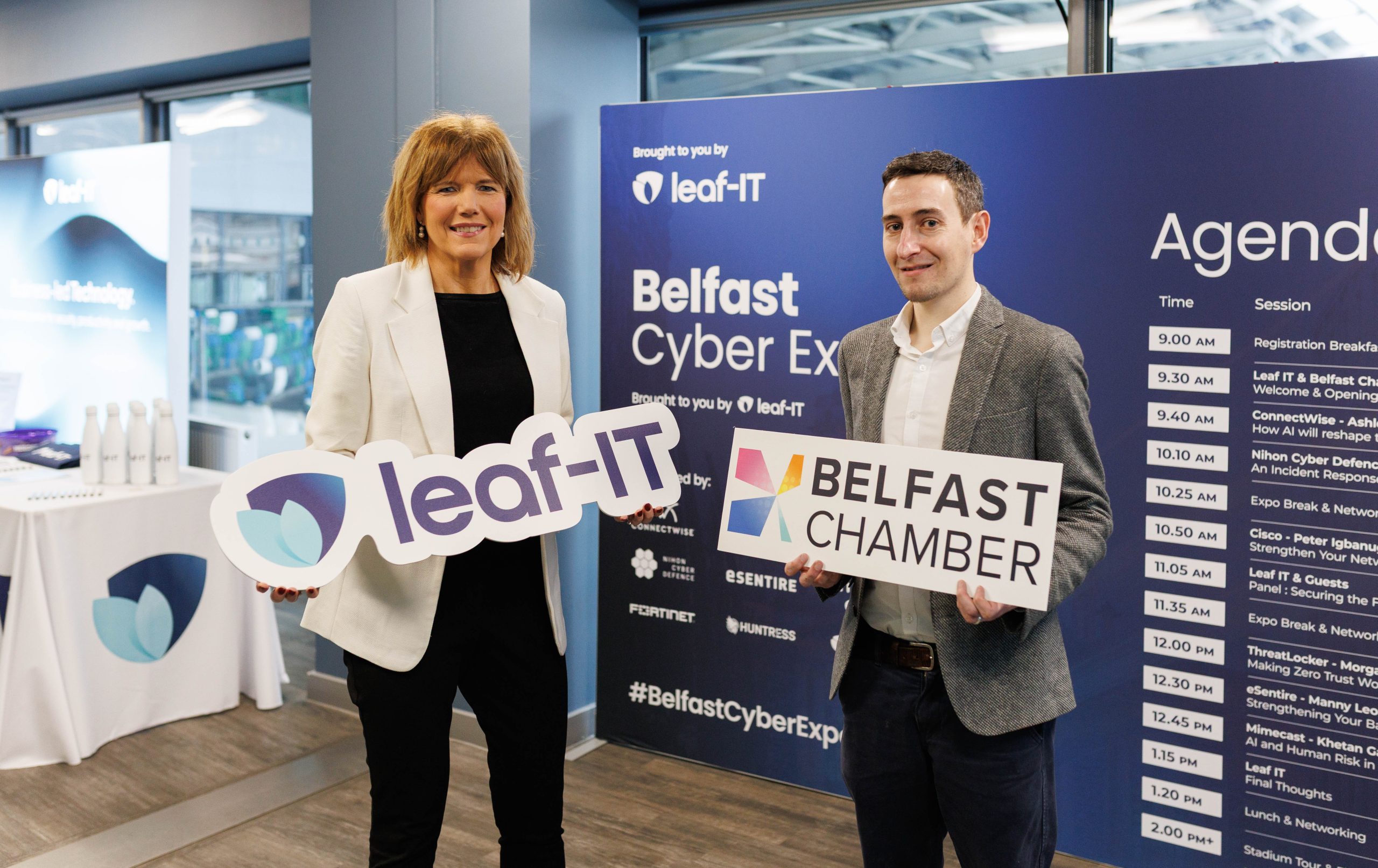
Northern Ireland’s business leaders have been urged to take greater responsibility for cyber security at a major new industry event hosted by Leaf IT in collaboration with Belfast Chamber.

The call to action was delivered at Belfast Cyber Expo 2026, held at the Clearer Twist National Stadium at Windsor Park and attended by over 150 delegates. Under the theme Securing the Future: AI, Risk & Resilience, the inaugural Expo brought together business leaders, IT professionals and cyber security specialists to examine the rapidly evolving threat landscape and the governance challenges emerging alongside accelerated artificial intelligence adoption.

Clare Guinness, CEO at Belfast Chamber, commented:
“Across many organisations cyber security has been treated as the sole preserve of IT departments, but safeguarding a business against digital threats is a responsibility that must be owned at leadership level.

“Events such as this provide an essential platform for collaboration, knowledge-sharing and practical guidance, ensuring that Northern Ireland businesses are equipped to operate securely and competitively in an increasingly complex digital world.”

Recent statistics highlighted at the Expo reflect the urgency of the issue. Global ransomware attacks increased by 43% year-on-year, while phishing attacks rose by 1,200% in 2025, driven largely by AI-powered social engineering tactics, according to the World Economic Forum. Closer to home, the UK Government’s Cyber Security Breaches Survey 2025 found that 43% of businesses and 30% of charities experienced a cyber security breach or attack in the past 12 months.

At the same time, AI adoption has surged to 88% among Northern Ireland businesses, raising significant governance and risk considerations. Despite this widespread uptake, 62% of organisations have no formal AI usage policy in place, and 30% actively encourage staff to experiment with freely available AI tools, contributing to the growth of so-called “shadow AI” practices.

Alongside keynote presentations, the Expo featured hands-on product demonstrations, specialist breakout sessions and structured networking opportunities, each designed to provide practical, actionable insight to strengthen security posture and embed more robust AI governance frameworks.

Andrew Johnston, Managing Director at Leaf IT, added:
“Our objective in hosting this inaugural Expo was to bring global expertise to Northern Ireland and provide businesses with clear, practical steps they can take to manage risk effectively.

“The level of engagement on the day demonstrated that organisations recognise the urgency of this issue and are committed to strengthening their approach to cybersecurity.”